The best monitors for a home office in 2026
We compared MercadoLibre's best-selling monitors and picked the ones that truly deliver for working from home: good size, a sharp image and eye comfort for long hours.
Prices verified on August 6, 2026 · How we do it
How we chose: We analyzed 12 real products on the market · MercadoLibre Argentina
As an affiliate, CompraGuide may earn a commission from qualifying purchases. It costs you nothing extra.
Quick verdict
For most people, the 27" Samsung with an IPS panel is the best buy: a large screen, good color and on sale. Want to spend less? The 24" LG Full HD. Want the sharpest image? The 27" Xiaomi A27qi QHD.
What to look for before buying
- Size: 24" is enough, 27" is ideal — More inches means more room for several windows without overlapping them. 24" works on a small desk; 27" pays off if you multitask a lot.
- Resolution: Full HD minimum, QHD at 27" — At 24" Full HD looks sharp. At 27" it's a bit softer: if you work with text or spreadsheets for hours, a QHD (1440p) makes a real difference.
- An IPS panel — IPS gives even color and a wide viewing angle; cheaper panels wash out from the side. It matters if you stare at the screen for hours or share it.
- Eye comfort — Look for 75 to 100 Hz (everything moves more smoothly) and, if you can, flicker-free tech and a blue-light filter: they strain your eyes less over long days.
- The right connectivity — Check it has your device's input (HDMI almost always; DisplayPort or USB-C if your laptop uses it). The wrong cable leaves you with no picture.
- Height and ergonomics — Having the monitor at eye level prevents neck pain. Many budget models don't adjust height: check it's VESA-compatible so you can add an arm.
Our recommendations
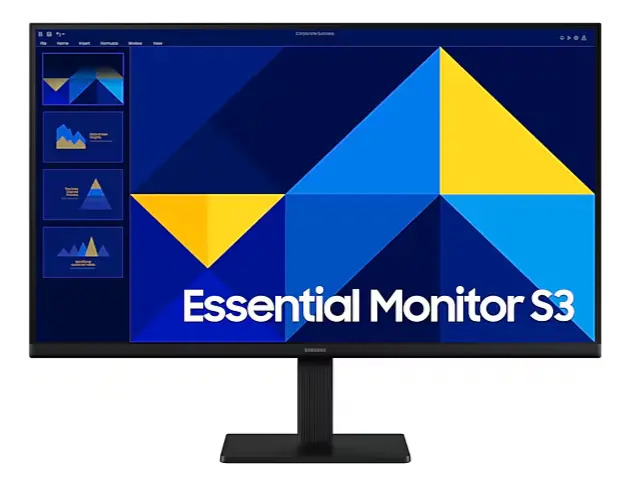
Samsung LS27D300 · 27" · Full HD · IPS · 100 Hz
27 inches with an IPS panel: good color and even viewing angles, ideal for hours in front of documents and spreadsheets. It's on sale and the screen you'll appreciate most day to day.
Create price alert
Leave it empty to be alerted on any drop.

Xiaomi A27qi · 27" · QHD 2560×1440 · 120 Hz
27 inches at QHD resolution (2560×1440): more workspace and much sharper text than Full HD. The best experience if you work long hours with spreadsheets and code.
Create price alert
Leave it empty to be alerted on any drop.

LG · 24" · Full HD · 100 Hz
The cheapest option from a known brand: 24 inches Full HD with a steep discount. Perfect for a small desk or if you want to spend the minimum without giving up a sharp image.
Create price alert
Leave it empty to be alerted on any drop.

Samsung S3 S30GD · 24" · Full HD · IPS · 100 Hz
Compact and with an IPS panel: 24 inches Full HD that look very sharp up close. A great middle ground if your desk is small but you want good color from a known brand.
Create price alert
Leave it empty to be alerted on any drop.
Side-by-side comparison
| Product | Price | Installments | Rating | Where |
|---|---|---|---|---|
| Samsung LS27D300 · 27" · Full HD · IPS · 100 Hz | $ 213.399 | 12 | — | MercadoLibre |
| Xiaomi A27qi · 27" · QHD 2560×1440 · 120 Hz | $ 359.999 | 12 | — | MercadoLibre |
| LG · 24" · Full HD · 100 Hz | $ 179.699 | 12 | — | MercadoLibre |
| Samsung S3 S30GD · 24" · Full HD · IPS · 100 Hz | $ 174.999 | 12 | — | MercadoLibre |
Choosing a monitor for a home office isn’t about the biggest screen or the highest refresh rate: it’s about the balance between size, sharpness and eye comfort so you stay comfortable for hours. We analyzed the best-selling monitors on MercadoLibre Argentina and kept the ones that genuinely deliver for working from home.
What actually matters in an office monitor?
Unlike a gaming monitor, here what rules is reading comfort: a size that gives you room for several windows, a resolution that shows text sharply and an IPS panel that doesn’t tire your eyes or shift color depending on your angle. A high refresh rate is a plus —everything moves more smoothly— but it’s not the first thing to look at.
Our pick for most people
The 27-inch Samsung with an IPS panel takes first place for a simple reason: 27 inches of IPS is the sweet spot for work —plenty of room for two windows side by side and even color even from an angle— and on top of that it’s on sale. It’s the upgrade you notice most over a small screen.
If your priority is spending as little as possible, the 24-inch LG Full HD gives you a sharp image from a known brand at a steep discount. And if you want the sharpest image, the Xiaomi A27qi adds QHD resolution: text looks much crisper and you gain real workspace.
Special mention: ergonomics
Many budget monitors don’t adjust height, and having the screen below eye level is a recipe for neck pain. Before buying, check it’s VESA-compatible: for a few pesos you can add an arm or stand and set it at the right height. It’s the cheapest comfort upgrade you can make.
What we left off
The cheapest 19 to 22-inch monitors are usually HD (not Full HD): for text and spreadsheets they fall short and you’ll want to replace them soon. We’d rather be honest: a 24-inch Full HD beats saving a little on a screen that will feel cramped.
Based on your case
A monitor that won’t tire your eyes
If you spend the day in front of the screen, prioritize an IPS panel, a 75 to 100 Hz refresh rate and, if you can, flicker-free tech and a blue-light filter. The 27” IPS Samsung on the podium aims exactly at that. Add a simple rule: the top of the screen at eye level and brightness matched to the room, no more, no less.
For working with two screens
If you want two monitors side by side, they should be identical (same height and color) and 24”, so they fit a standard desk without getting too wide. Check they’re VESA-compatible to mount them on a dual arm and align them. Two 24” Samsung S3 IPS make an even, affordable pair.
For a small desk
In tight spaces, 24” is the sweet spot: at Full HD it looks sharp up close and doesn’t force you to sit back. Avoid ultra-wide curved screens. The 24” LG is the most compact, cheapest option in the lineup.
For use with the laptop closed
If you want to close the laptop and work only off the monitor (clamshell mode), check the monitor has the input your laptop provides (HDMI almost always; USB-C if your laptop supports it, which can also charge it over a single cable) and add an external keyboard and mouse.
Complete the setup
Since you’re building out your desk, add a good mechanical keyboard to type comfortably all day.
Frequently asked
24 or 27 inches for work?
24 inches is enough and looks sharper at Full HD; 27 inches gives you more room for several windows at once. If you multitask a lot or look at large spreadsheets, 27 is worth it.
Full HD or QHD (1440p)?
At 24 inches, Full HD is enough. At 27 inches Full HD looks a bit softer: if you spend the day with text, code or spreadsheets, a QHD like the Xiaomi A27qi's is very welcome.
Is a gaming monitor good for a home office?
Yes. Many 'gaming' monitors are exactly IPS Full HD with a high refresh rate, which looks smoother in the office. Just avoid very wide curved screens if your desk is small.
Why don't you recommend the cheapest 19 to 22-inch ones?
Because they're usually HD (not Full HD): for text and spreadsheets they fall short and you'll want to replace them soon. We'd rather pick a 24-inch Full HD than save a little there.
One or two monitors for work?
Two screens pay off a lot if you multitask (code and browser, or a spreadsheet and a video call). To keep them even, pick two identical 24-inch monitors with VESA support and mount them on a dual arm. If your desk is small, a single 27-inch gives you similar room without taking up as much space.
How do I set the monitor at the right height?
The top of the screen should sit at eye level. Many budget monitors don't adjust height: check it's VESA-compatible and add an arm or stand for a few pesos. It's the cheapest comfort upgrade you can make.
Can I work with the laptop closed using only the monitor?
Yes, that's clamshell mode: you close the laptop and use the monitor as the main screen with an external keyboard and mouse. Just check the monitor has the input your laptop provides (HDMI almost always; over USB-C, some also charge the laptop with the same cable).
Are prices and stock up to date?
Yes: we pull real price and availability from MercadoLibre. They can change at any time; the link always takes you to the current offer.
Before you choose, read this
- Is a curved or a flat monitor better for working? For a normal 24 to 27-inch monitor, flat is the safe choice: it's cheaper, distortion-free for text and spreadsheets, and you won't notice the curve anyway. Curved only earns its keep on wide screens — 34 inches and up, especially ultrawides — where it wraps the edges toward you and cuts down eye and neck movement. Below that, don't pay extra for the curve.
- Is a second monitor worth it for working from home? If your work means looking at two things at once — writing while reading a source, coding while testing, being on a call while taking notes — a second monitor is one of the cheapest real productivity upgrades: you stop losing time switching windows. If you focus on one task at a time, or your desk is tight, it's clutter you don't need. An ultrawide is the alternative when you want the space without the middle bezel.
- What height should my monitor and chair be? Monitor: the top of the screen at or just below eye level, about an arm's length away, tilted slightly up. Chair: feet flat on the floor, knees around 90°, hips level with or just above the knees, and elbows at about 90° when your hands are on the desk (desk height around 72–75 cm). If your feet don't reach the floor, use a footrest; if the monitor is too low, raise it with a stand or a stack of books.
- How do I set up an ergonomic home office without spending a fortune? Spend in this order: first the chair (it's the only problem you can't fix with a hack), then monitor height (often free, with a stack of books), and only then a separate keyboard and mouse. Those three points define your posture; the fancy desk and nice accessories come much later.
- What monitor do I need for a home office? For work, the sweet spot is a 24 to 27-inch monitor with Full HD (24") or QHD/1440p (27") resolution, an IPS panel and — crucially — adjustable height to raise it to eye level. Bigger than 27" on a normal desk makes you move your head; 4K only makes sense at 27" and up. Prioritize height adjustment over inches or refresh rate.
Related guides
Still unsure? Tell the assistant what you need and it'll recommend based on your budget.
Ask the assistant →