The best SSD drives 2026
We compare real SSDs from MercadoLibre Argentina, SATA and NVMe, and explain how to know which one fits your PC or laptop before buying.
Prices verified on August 6, 2026 · How we do it
How we chose: We analyzed 15 real products on the market · MercadoLibre Argentina
As an affiliate, CompraGuide may earn a commission from qualifying purchases. It costs you nothing extra.
Quick verdict
Before comparing prices, check which format your machine takes: an M.2 NVMe SSD won't fit a computer that only has a 2.5-inch bay. That said, the 240 GB Patriot Burst is the best buy for reviving an old PC; the 128 GB Foresee is the cheapest entry; and the 480 GB Patriot if you want capacity not to run short.
What to look for before buying
- Format: 2.5-inch SATA or M.2 NVMe — It's the first thing and what causes most mistakes. The 2.5-inch SATA connects with two cables and fits any desktop and almost any laptop that once had a mechanical drive: it's the universal replacement. M.2 NVMe is a small board that screws straight onto the motherboard and is far faster, but your machine needs that slot. If you don't know what you have, open the machine and look, or search the exact model before buying.
- Real speed: SATA vs NVMe — A SATA SSD runs around 500 MB/s and an NVMe can exceed 2000 MB/s. That sounds enormous and for large file transfers it is. But for what most people do — booting, opening a browser, loading programs — the big jump already happened when you moved from mechanical to SSD. From there to NVMe the improvement is far less perceptible.
- Capacity: what you actually need — 120 or 128 GB just about covers the operating system and a few programs: you'll be managing space constantly. 240 GB is the comfortable minimum as your only drive. 480 GB or more is advisable if you keep photos, games or work files. A common cheap strategy: a small SSD for the system and the old mechanical drive as file storage.
- TLC memory and controller — Budget SSDs typically use TLC or QLC memory, which is cheaper but tolerates fewer write cycles than MLC. For normal home use the difference is theoretical: you'll replace the computer before wearing out the drive. Where it matters is if you'll write and erase enormous amounts of data daily, which doesn't happen in home use.
- Brand and warranty — On SSDs the brand matters more than on other components, because a failing drive takes your data with it. Kingston and Patriot are known brands with real local warranty. Generic or OEM units are considerably cheaper and usually work fine, but if they fail there's nobody to claim from. Whichever you pick, back up what matters: no drive lasts forever.
Our recommendations

interno Patriot Burst PBU240GS25SSDR PE000542 240GB negro
240 GB in 2.5-inch SATA form, which fits any PC or laptop with a standard bay, from a brand with real warranty. The comfortable capacity to be your only drive.
Create price alert
Leave it empty to be alerted on any drop.
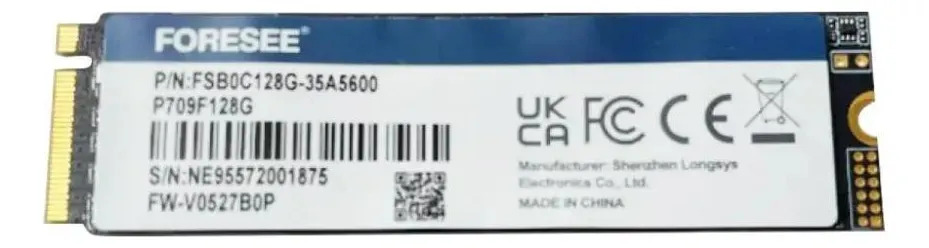
Disco SSD OEM Foresee 128GB M.2 2280 NVMe PCIe 3.0 Interno Negro
128 GB M.2 NVMe, the cheapest in the group and the fastest on paper. Ideal as a system drive if your board has an M.2 slot and you already have another drive for files.
Create price alert
Leave it empty to be alerted on any drop.

Disco SSD 120GB Hiksemi Wave 2.5" SATA III para PC y Laptop Negro
120 GB in 2.5-inch SATA: the cheapest entry in the universal format. A good option for reviving an old PC for almost nothing.
Create price alert
Leave it empty to be alerted on any drop.

Disco Sólido Ssd Kingston A400 240gb
Kingston is one of the most established storage brands, with solid backing and warranty. The alternative if you'd rather pay for peace of mind.
Create price alert
Leave it empty to be alerted on any drop.

SSD Patriot Burst de 480 GB SATA III para PC y Notebook
480 GB: double the capacity to work without managing space, in the SATA format that fits everywhere. The pick if it'll be your only drive.
Create price alert
Leave it empty to be alerted on any drop.
Side-by-side comparison
| Product | Price | Installments | Rating | Where |
|---|---|---|---|---|
| interno Patriot Burst PBU240GS25SSDR PE000542 240GB negro | $ 86.963 | 12 | — | MercadoLibre |
| Disco SSD OEM Foresee 128GB M.2 2280 NVMe PCIe 3.0 Interno Negro | $ 55.000 | 12 | — | MercadoLibre |
| Disco SSD 120GB Hiksemi Wave 2.5" SATA III para PC y Laptop Negro | $ 59.421 | 12 | — | MercadoLibre |
| Disco Sólido Ssd Kingston A400 240gb | $ 110.000 | 12 | — | MercadoLibre |
| SSD Patriot Burst de 480 GB SATA III para PC y Notebook | $ 135.899 | 12 | — | MercadoLibre |
Swapping a mechanical drive for an SSD is, without argument, the best upgrade you can make to a computer. More than adding memory, more than changing the processor: a machine that took three minutes to boot is ready in fifteen seconds.
First: which format your machine takes
This is the part that generates the most returns.
- 2.5-inch SATA — connects with two cables, about the size of a cigarette packet. Fits any desktop and almost any laptop that once had a mechanical drive. It’s the universal replacement.
- M.2 NVMe — a thin board that screws straight onto the motherboard. Far faster, but your machine needs that slot.
If you don’t know which you have: open the machine and look, or search your exact laptop model together with “M.2” or “NVMe”.
Our pick
For most people the 240 GB Patriot Burst is the right buy: SATA format that fits everywhere, comfortable capacity as your only drive, and a brand with warranty. To spend the least, the 128 GB Foresee (if you have an M.2 slot) or the 120 GB Hiksemi in SATA. And if you want not to run short, the 480 GB Patriot.
On speed, honestly
An NVMe is four times faster than SATA on paper. But the jump you’ll actually feel already happened when you moved from mechanical to SSD. From SATA to NVMe the difference shows when moving very large files, not when booting or opening a browser. Don’t overpay for that figure if your use is normal.
The cheapest trick
If your PC has room for two drives: fit a small SSD for the system and keep the old mechanical drive as storage for photos and files. You get all the speed where it counts and give up not a single gigabyte.
And a warning that applies to any drive: back up what matters. None last forever, and SSDs fail without warning noises.
Prices come from MercadoLibre Argentina and update daily.
Frequently asked
How do I know whether my PC takes M.2 or 2.5-inch?
The safe way is to look. On a laptop, remove the bottom cover: if you see a rectangular drive about the size of a cigarette packet connected with two cables, that's a 2.5-inch bay. If you see a thin board resembling a small RAM stick screwed to the board, that's M.2. Many machines have both, in which case you can add an M.2 without removing the old drive. If you'd rather not open anything, search your exact model plus the words M.2 or NVMe: the manufacturer's spec sheet will say.
Is upgrading an old PC from a mechanical drive to an SSD worth it?
It's the best upgrade you can make to a computer, without question. Swapping a mechanical drive for an SSD makes more difference than doubling the RAM or changing the processor: a machine that took three minutes to boot is ready in fifteen seconds, and programs open instantly. It's the only upgrade that makes a seven or eight year old PC feel usable again, and for what a 240 GB SSD costs today it's money extremely well spent.
How much capacity do I need?
If it's your only drive, 240 GB is the comfortable minimum: Windows, the usual programs and some files fit, though you'll need to stay tidy. At 480 GB you work without thinking about it. The 120 or 128 GB units only make sense in two cases: as a system drive in a PC that also has a mechanical drive for storage, or in a very basic machine. That combination — small SSD for the system, old drive for files — is the cheapest way to speed up a PC without giving up space.
Are prices and stock up to date?
Yes: we take real price and availability from MercadoLibre Argentina and refresh them daily. They can change at any time; the link always takes you to the current offer.
Related guides
Still unsure? Tell the assistant what you need and it'll recommend based on your budget.
Ask the assistant →